Auto Exposure
The Auto Exposure tab allows you to automatically adjust the exposure settings based on the brightness of your scene.
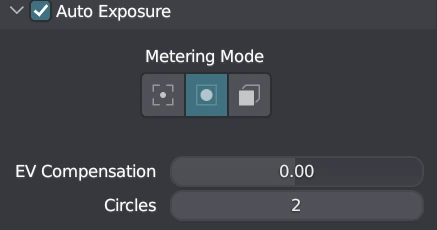
Auto Exposure Settings
Mode
Select an auto-exposure metering mode:
- Center Spot: Sample the pixel in the center of the window.
- Center Weighed: Sample a grid of pixels and give more weight to the ones near the center.
- Full Window: Sample a grid of pixels across the whole window.
EV Compensation
Adjust the exposure compensation value to overexpose or underexpose the scene. Values can range from -3 to 3, with a precision of 2.
Circles
Center Weighted Only
Set the number of circles to sample for auto exposure. Increasing the number of circles provides more accurate auto exposure but may slow down the viewport. The minimum value is 2, and the maximum value is 20.
Grid
Full Window Only
Set the number of rows and columns to sample for auto exposure. Increasing the number of rows and columns provides more accurate auto exposure but may slow down the viewport. The minimum value is 2, and the maximum value is 20.
Warning
These auto exposure settings allow you to automatically adjust the exposure of your scene based on the brightness levels, providing a more balanced and visually appealing result.